

Maintaining an ICF coaching log is part of being “ICF-ready”, whether you are building hours toward a credential or keeping clean records for renewal. A strong log is not about perfection. It is about consistently capturing the right fields, so your totals and documentation are defensible when you need them.
ICF provides a coaching log template you can use as a starting point. ICF also publishes experience requirements by credential level, which is the reason accurate tracking matters in practice.
What an “ICF coaching log” is (and what it is not)
An ICF coaching log is a record of your coaching sessions that captures the details you will need to summarize your experience (client, dates, minutes/hours, session type, and paid vs pro bono), using a format aligned with ICF-style documentation.
It is not a journal of sensitive client details. Keep notes private, minimal, and confidential, and store anything sensitive in a secure system you control.
Two ways to maintain an ICF coaching log
Option A: Maintain the ICF coaching log in Excel (manual process)
ICF offers an Excel-based template/sample that many coaches use.
The tradeoff is operational: most coaches end up doing “end-of-week catch-up,” which increases errors and missed sessions.
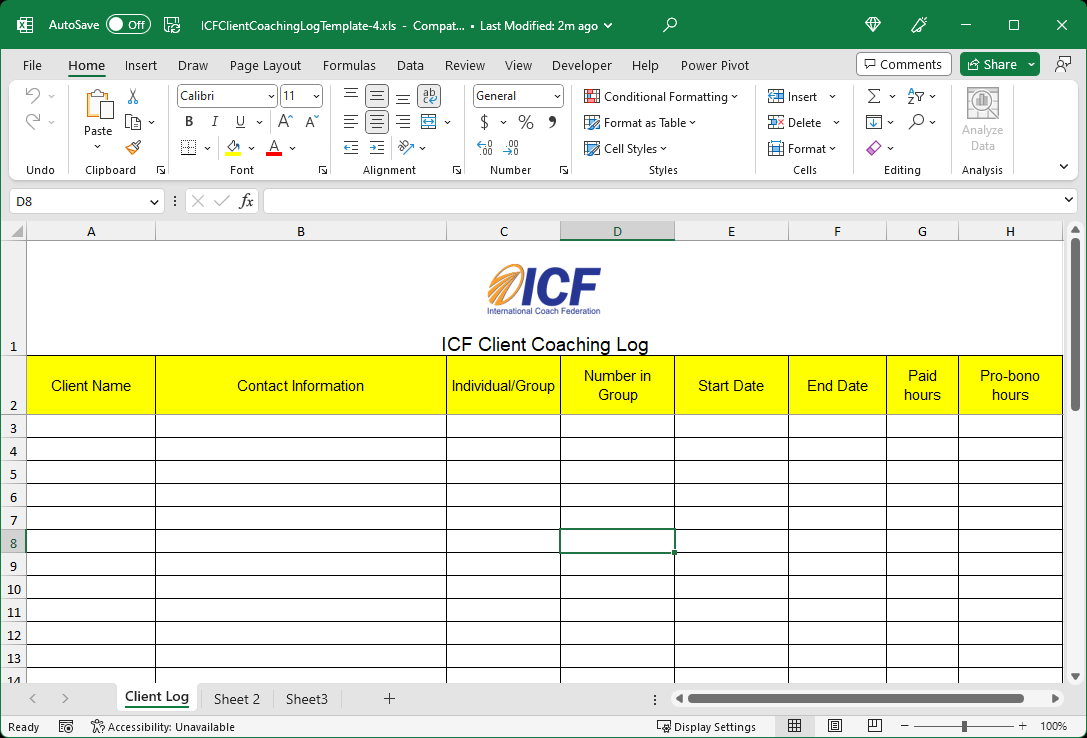
When Excel is a good fit
- You want a single file you can store and back up
- Low volume practice (few sessions per week)
- You are disciplined with weekly admin time
Option B: Use the Coaching Log mobile app (low friction)
If your main problem is consistency, a fast capture workflow is the simplest fix.
With the Coaching Log app, you can log a session in seconds, keep running totals automatically, and export an ICF-formatted spreadsheet when needed (Pro).
When is the Coaching Log app a good fit
- You would rather be coaching than doing admin work
- You want to spend less than 5 seconds to log a session
- You want a dashboard that is always up-to-date
Best of all, the Standard version of the Coaching Log app is free! Try it now.
The minimum fields you should capture every time
To maintain an ICF coaching log that stays usable months later, capture these consistently:
- Client identifier (name or code)
- Contact info (minimal, as required for your tracking approach)
- Session date
- Session duration (minutes)
- Individual vs group
- Paid vs pro bono
- Start date and end date (if your format uses them)
A simple operating cadence for staying up to date
This cadence is what prevents “credential application panic” later:
- Log within 24 hours (best: immediately after the session)
- Weekly reconciliation (10–15 minutes): confirm no missing sessions, fix durations, verify paid/pro bono flags
- Monthly audit (15 minutes): spot-check totals, group session counts, and client identifiers for consistency
- Quarterly export/check: generate a clean summary view, verify it matches your expectations
If you want to eliminate steps 2 and 3, the Coaching Log app is designed for fast post-session capture and an always-current dashboard.
Top pitfalls that derail ICF coaching logs (and how to avoid them)
- Inconsistent client naming: pick one format and stick to it (or use a client code).
- Minutes vs hours confusion: choose one unit (minutes is simplest) and normalize everything.
- Paid vs pro bono misclassification: decide your rule once and apply it consistently.
- Group session ambiguity: record group size and session type every time.
- Backfilling weeks later: memory-based edits create errors. Capture immediately.
Confidentiality checklist (keep it clean and safe)
- Store your log securely.
- Avoid sensitive client content in the log.
- Share only with those who need it and only what is necessary.
- Keep frequent backups of your log.
Coaching data is sensitive, and the Coaching Log app is built around an on-device storage model with privacy controls.
If you are tired of spreadsheets, try the fastest path
If your goal is to maintain an ICF coaching log with minimal admin overhead, try the Coaching Log app. The standard version is free and built to keep your records up to date throughout the year, not just when deadlines approach.

(iOS 18+)

(Android 11+)
Frequently asked questions (FAQs)
Do ICF credentials require an ICF coaching log?
ICF requires you to document coaching experience in a structured way, and many coaches use ICF’s log template/sample to do that.
What is the easiest way to maintain an ICF coaching log?
The easiest way is the method you will do consistently: either weekly Excel updates or logging immediately after sessions using a fast workflow.
What fields should be in an ICF coaching log?
Use ICF’s template/sample as your baseline and stay consistent with client identifiers, dates, duration, session type, and paid vs pro bono.
How often should I update my ICF coaching log?
Ideally after every session. At minimum: weekly reconciliation plus a monthly audit.
Is Excel acceptable for an ICF coaching log?
Many coaches use Excel, especially ICF’s sample template. The main risk is manual overhead and catch-up errors.
Can I export an ICF-style spreadsheet from Coaching Log?
Yes, Coaching Log supports ICF-formatted Excel export as a Pro feature.
Can I import my existing Excel coaching log into the app?
Yes, Coaching Log Pro supports import of an ICF-template-based XLSX coaching log.
Is my client data private if I use Coaching Log?
Coaching Log describes an on-device storage approach and privacy controls for analytics and purchase data.
How do I track progress toward ACC/PCC/MCC hours?
Use ICF’s published experience requirements as the reference point, and keep your log totals current so you can compare at any time.